
Building and Using Skills
Learn how to create reusable skills that agents can use and share.
What Are Skills?
Skills are portable packages of instructions, scripts, and resources that agents can use to accomplish tasks. Fleet skills follow the open Agent Skills specification.
A skill can contain:
- Instructions — Step-by-step procedures in markdown
- Scripts — Executable code the agent can run
- Assets — Templates, reference files, and other resources
Skill Structure
Each skill is a folder containing a skill.md file and any supporting assets:
my-skill/
├── skill.md          # Instructions and metadata (required)
├── template.html     # Template file (optional)
├── process.sh        # Script (optional)
└── examples/         # Reference materials (optional)
The skill.md file defines what the skill does and how to use it.
skill.md Format
Skills use YAML frontmatter for metadata, followed by markdown instructions:
---
name: code-review
description: Reviews code for quality, security, and maintainability
compatibility: all
allowed_tools:
  - read_file
  - list_files
  - system_shell
---

# Code Review

Review code for quality, security, and maintainability.

## Steps

1. Read the code completely before commenting
2. Check for logical errors and bugs
3. Look for security vulnerabilities
...
Frontmatter Fields
| Field | Required | Description |
|---|---|---|
name |
Yes | Unique identifier for the skill |
description |
Yes | Brief description shown in the skills browser |
compatibility |
No | Which agent types can use this skill (all, cli, standard) |
allowed_tools |
No | Suggested list of tools the skill expects to use (guidance for the model — not enforced) |
Skill Discovery
Fleet automatically discovers skills from the skills directory:
Default location:
- macOS:
~/Library/Application Support/familiar/skills/ - Linux/Windows:
~/.familiar/skills/
Fleet scans this directory recursively for skill.md files. You can organize skills into subdirectories:
skills/
├── development/
│   ├── code-review/
│   │   └── skill.md
│   └── pr-summary/
│       └── skill.md
├── writing/
│   ├── blog-post/
│   │   └── skill.md
│   └── email-draft/
│       └── skill.md
└── data/
    └── csv-analysis/
        └── skill.md
Skills are deduplicated by name — if two skills have the same name, only one is loaded.
Creating a Skill
Option 1: Ask an Agent (Recommended)
The easiest way — ask an agent to create a skill:
Create a skill called "Code Review" that reviews code for bugs, security, and performance.
The agent will:
- Create a new folder in the skills directory
- Write a
skill.mdfile with appropriate frontmatter - Add any necessary supporting files
You can also give more detailed instructions:
Create a skill called "Weekly Report" that:
- Reads data from ~/reports/metrics.csv
- Generates a summary with charts
- Only needs read access to files (no writing)
Option 2: Create Manually
- Open the skills folder: Settings → Skills → Open Folder
- Create a new folder for your skill (e.g.,
my-skill/) - Create a
skill.mdfile with frontmatter and instructions - Add any supporting scripts or templates
Option 3: Skills Browser
- Open the Skills Browser from the sidebar or Settings
- Click New Skill
- Fill in the name and description
- Edit the skill content in the editor
- Save
Using Skills
Agents automatically discover and use skills when relevant. You can also explicitly request a skill:
"Use the Code Review skill on this file"
"Apply the Weekly Report skill"
Control which skills an agent can access in Settings → Permissions → Allowed Skills.
Example: Code Review Skill
skill.md:
---
name: code-review
description: Reviews code for quality, security, and maintainability
compatibility: all
allowed_tools:
  - read_file
  - list_files
  - system_shell
---

# Code Review

Review code for quality, security, and maintainability.

## Steps

1. Read the code completely before commenting
2. Check for logical errors and bugs
3. Look for security vulnerabilities
4. Assess readability and naming
5. Suggest improvements

## Guidelines

- Be constructive, not critical
- Explain the "why" behind suggestions
- Prioritize significant issues over style nitpicks
- Focus on maintainability and clarity
Skill Tool Guidance
Skills can declare which tools they expect to use in their frontmatter:
allowed_tools:
  - read_file
  - list_files
  - system_shell
Important: The allowed_tools field is guidance/documentation for the model — it's not enforced. It helps the model understand what tools a skill is designed to use.
Actual tool restrictions are controlled by the agent's execution mode (Restricted, Read-Only, Mutable, or Open) and any custom permission rules. The execution mode is the ultimate authority over what tools an agent can access, regardless of what a skill declares.
Managing Skills
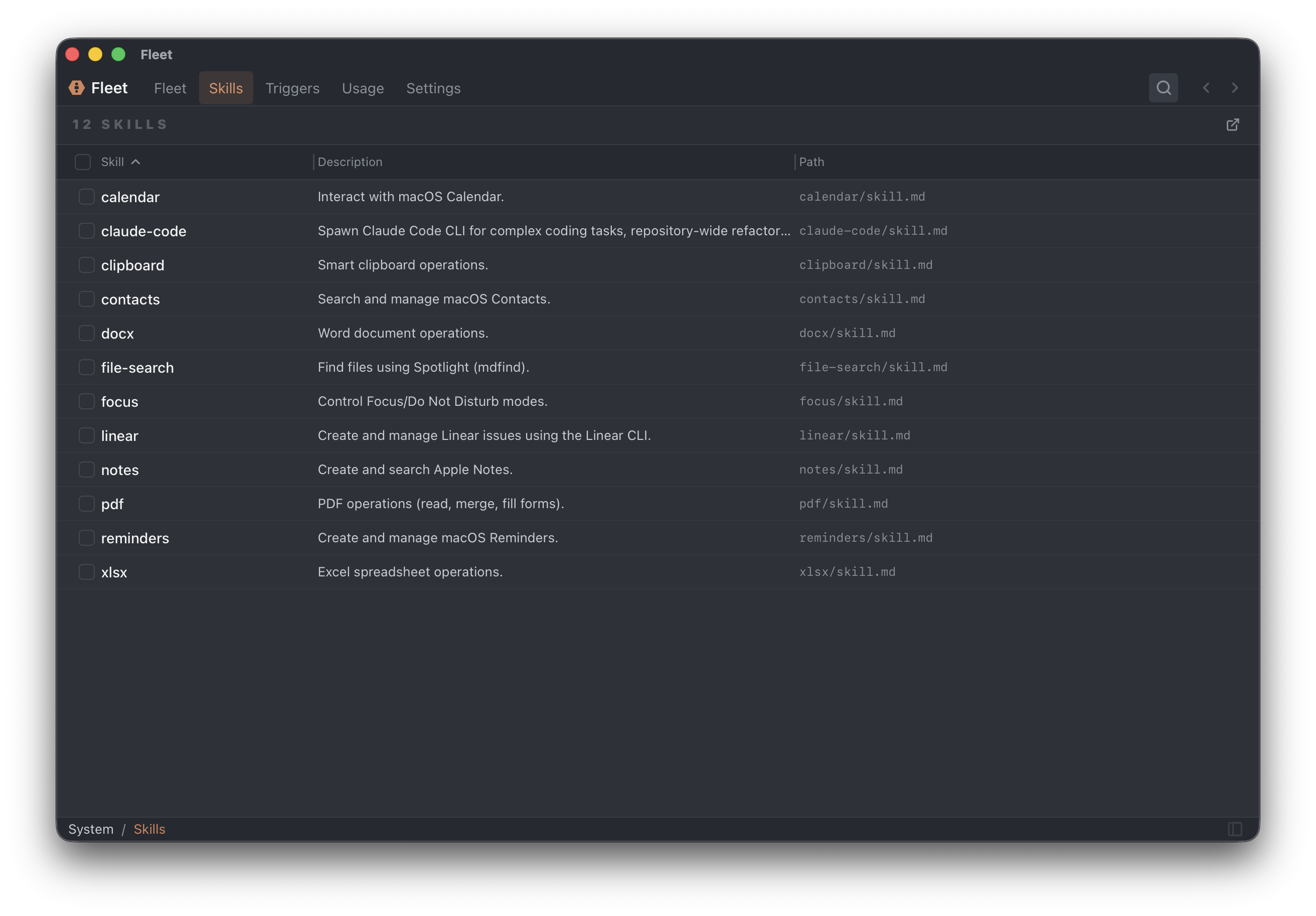
Skills Browser
Access via Settings → Skills or the Skills panel in the agent sidebar.
Features:
- View all installed skills
- Search by name or description
- Edit skill content
- Delete individual skills or bulk delete
- Open skills directory in Finder
Column Display
The skills browser shows:
- Name — Skill identifier
- Description — What the skill does
- Path — Location on disk
Click column headers to sort. Resize columns by dragging.
Creating & Using Skills
Ask an agent to create a skill for you: You can ask your agent to help you create a new skill from scratch. Tell it what the skill should do, and it will write the instructions, scripts, and setup needed to make it work.
Find skills online: If you find a skill you like from online sources, you can ask an agent to help you copy it into Fleet. Agents can fetch the skill definition, adapt it if needed, and save it to your Fleet workspace.